HVAC software pricing
HVAC field service software pricing that scales with your crew.
Compare TuffOps plans for HVAC contractors that need work orders, equipment records, estimates, invoices, customer portal access, warranty workflows, and refrigerant compliance. Pay per field technician, while office and dispatch seats are included free on every tier.
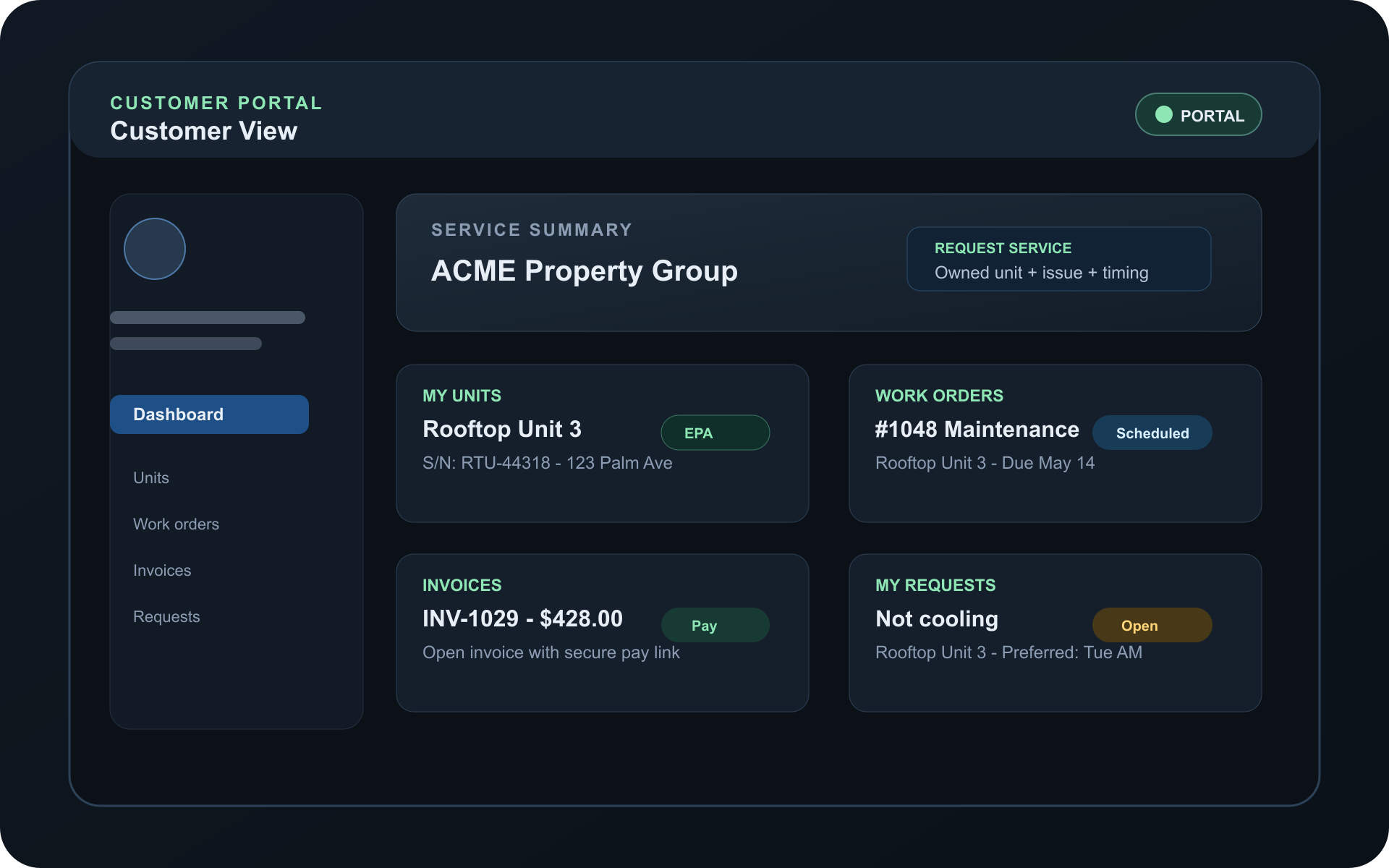
HVAC software pricing with the back office included
TuffOps pricing is built for how HVAC companies actually staff the work. Field technicians drive paid seat count, while the people who schedule jobs, answer customers, prepare invoices, and keep records organized are included as office and dispatch seats on every plan.
Pay for field capacity
Monthly subscription cost follows the technicians completing work in the field instead of every employee who needs visibility into the schedule.
Know when compliance is included
Refrigerant compliance is a Starter add-on and is included in Pro and Enterprise, so regulated HVAC work can be priced clearly from the start.
Plan for setup before rollout
Most teams can start with a simple rollout. Larger imports, branch structures, branded portals, and custom integrations may add onboarding scope.
Compare TuffOps pricing plans
Pick the plan that fits your team size, service volume, and compliance needs. TuffOps starts as the operating system for HVAC service teams, then adds field visibility, customer-facing workflows, payments, integrations, and compliance automation as your operation grows.
Built for HVAC — not generic field service.
Starter / Core Ops
Get organized and eliminate paperwork chaos.
The core operating system for HVAC service teams.
$59 /tech/mo
For small HVAC teams who need clean workflows, organized jobs, and consistent documentation.
See how HVAC teams use StarterCore Ops includes
- A clean staff app that keeps everyone on the same page.
- User roles that reduce mistakes and protect sensitive info.
- Customer records that stay organized and easy to find.
- Unit history that stops guesswork on every visit.
- Equipment model catalogs that keep installs consistent.
- Item catalogs so quotes and invoices stay accurate.
- Quotes that look professional and help win more jobs.
- Work orders that keep techs focused and accountable.
- Photos and notes that prove the work was done right.
- Work order PDFs your office can trust.
- QR unit pages and service requests tied to the right equipment.
- Simple invoices that get customers billed clearly.
- Email notifications that keep customers in the loop.
- Basic reminders so fewer jobs slip through the cracks.
Growth / Field Ops
Run your field with real-time visibility and faster payments.
Field visibility, mobile workflow, customer portal, dispatch, payments, and integrations.
$79 /tech/mo
For growing teams who need dispatch visibility, customer communication, and field payments.
See Field Ops in actionEverything in Starter, plus
- Device-specific checklists that reduce mistakes and callbacks.
- Inventory tracking so techs show up with the right parts.
- Invoice reminders that recover revenue you might otherwise lose.
- A customer portal that reduces office phone calls.
- Mobile field workflows that keep techs accurate and on track.
- Technician signatures that help protect you from disputes.
- Location tracking so dispatch can see field progress.
- Dispatch routing that helps reduce drive time.
- ETA and on-the-way updates that build customer trust.
- SMS and WhatsApp updates customers are more likely to read.
- QuickBooks sync that reduces double entry.
- A Document Vault that keeps important files linked to the work.
- Vendor and contact tracking that simplifies purchasing.
- Tap to Pay options for collecting payment in the field.
Enterprise / Compliance
Own compliance and installs at scale with AHRI + EPA workflows.
Compliance, warranty/AHRI automation, API/custom integrations, and advanced controls.
From $99 /tech/mo
For companies who need EPA workflows, AHRI automation, warranty packets, and advanced controls.
See HVAC compliance automatedEverything in Growth, plus
- EPA refrigerant workflows that make audit prep less stressful.
- Part 82/84 records for charge events, leak rates, repairs, and deadlines.
- Compliance exports that make reporting easier.
- EPA visibility in the customer portal when you choose to expose it.
- Warranty registration packets that reduce install paperwork.
- AHRI automation that reduces manual lookup and documentation errors.
- Read-only API keys for secure integrations.
- Advanced controls, caps, retention, rollout support, and custom workflows.
How TuffOps compares
TuffOps is built specifically for HVAC operations — not a generic field‑service platform adapted for multiple trades.
| Workflow | TuffOps | Jobber | Housecall Pro | ServiceTitan |
|---|---|---|---|---|
| HVAC-specific workflows | Yes | Partial | Partial | Yes |
| AHRI automation | Yes | No | No | Partial |
| EPA refrigerant compliance workflows | Yes | No | Add-on | Add-on |
| Warranty packet automation | Yes | No | Partial | Partial |
| Tap to Pay / field payment options | Yes | Yes | Yes | Yes |
| QuickBooks sync | Yes | Yes | Yes | Partial |
Comparison uses practical plan-fit language and public product positioning as of May 2026; exact availability can vary by plan, setup, market, and integration configuration.
What’s included in each plan (full details)
Starter / Core Ops
Clean staff app
Give office users and technicians one organized place to see the customer, equipment, work, notes, photos, and billing context they need.
User roles
Control who can view, edit, approve, or manage sensitive operational records so everyday work has fewer permission mistakes.
Customer records
Keep customer, site, and contact history organized so your team can find the right account without digging through paper or inboxes.
Unit history
Attach service history to the actual equipment, giving techs better context before they diagnose, quote, repair, or replace a unit.
Equipment model catalogs
Standardize model information for common installs and replacements so records stay cleaner across the team.
Item catalogs
Keep common labor, materials, fees, and service items ready for quotes and invoices so pricing stays more consistent.
Quotes
Create professional quotes with organized line items and customer-ready detail, then keep accepted work connected to the job.
Work orders
Give technicians a focused work view with job details, status, customer context, and the records needed to close work cleanly.
Photos and notes
Capture proof of work, before-and-after condition, customer context, and technician observations directly on the job record.
Work order PDFs
Generate office-friendly records that summarize the completed work and can be shared, filed, or reviewed later.
QR unit pages and service requests
Let customers or staff start requests from the right equipment so dispatch receives cleaner context from the beginning.
Simple invoices
Bill customers with straightforward invoice records connected to the service work and customer account.
Email notifications
Send basic updates that keep customers aware of important job and billing activity.
Basic reminders
Help the office track follow-up work and routine tasks so fewer jobs or customer commitments get missed.
Growth / Field Ops
Device-specific checklists
Attach checklist steps to equipment and job context so technicians capture the right readings, photos, and completion details.
Inventory tracking
Track parts and materials more clearly so field teams have better visibility before they head to a job.
Invoice reminders
Prompt customers on unpaid invoices so the office can recover revenue without relying entirely on manual follow-up.
Customer portal
Give customers a place to view service history, requests, invoices, quote activity, and account information without calling the office for every update.
Mobile field workflows
Guide techs through job updates, documentation, photos, signatures, and closeout steps while they are still in the field.
Technician signatures
Capture sign-off on work records to support customer acknowledgment and reduce ambiguity if a dispute comes up later.
Location tracking
Help dispatch understand field progress and technician location context when routing, scheduling, or answering customer questions.
Dispatch routing
Support better route planning and sequencing so teams can reduce avoidable drive time where the schedule allows.
ETA and on-the-way updates
Keep customers informed as technicians move through the day, reducing uncertainty and missed appointment windows.
SMS and WhatsApp updates
Reach customers on higher-attention channels for appointment, status, and payment-related updates when configured.
QuickBooks sync
Reduce duplicate accounting entry by syncing supported customer, item, invoice, and payment information with QuickBooks.
Document Vault
Keep important customer, vendor, job, and equipment documents attached to the related operational record.
Vendor and contact tracking
Organize supplier and contact details so purchasing, warranty, and office follow-up are easier to coordinate.
Tap to Pay options
Enable field payment collection options where supported by the configured payment provider, credentials, and device setup.
Enterprise / Compliance
EPA refrigerant workflows
Capture and organize refrigerant activity inside the job flow so audit preparation is less dependent on separate spreadsheets.
Part 82/84 records
Track charge events, leak-rate context, repair activity, and deadline-related records to support regulated refrigerant work.
Compliance exports
Export organized compliance records for review and reporting; TuffOps helps with recordkeeping, but does not guarantee compliance automatically.
Customer portal EPA visibility
Choose when to expose selected compliance information in the customer portal so property owners can review relevant records.
Warranty registration packets
Build install documentation packets that keep customer, equipment, AHRI, and warranty details together.
AHRI automation
Reduce manual lookup and readiness errors by assisting with AHRI matching and documentation, while allowing review when a match needs confirmation.
Read-only API keys
Support secure integrations that need access to operational data without granting write access to connected systems.
Advanced controls and rollout support
Add account-level caps, retention settings, implementation help, custom workflows, and support for more complex operating structures.
Frequently Asked Questions
Quick answers to the pricing and workflow questions HVAC owners usually ask before a walkthrough.
Do I pay per tech or per user?
Pricing is based on field technician seats. Office and dispatch users can be included by plan, so your subscription follows the team doing field work instead of every person who needs visibility.
Can office staff be free?
Yes, office and dispatch seats can be included depending on the plan and rollout scope. Larger back-office teams or multi-branch structures can be handled during Enterprise setup.
Do you integrate with QuickBooks?
Yes. TuffOps supports QuickBooks sync paths that help reduce duplicate entry for customers, invoices, payments, and related accounting records.
Do you support EPA 608 tracking?
Yes. TuffOps helps capture, organize, gate, and export refrigerant records for EPA workflows, including technician certification context and service activity. It supports compliance work, but does not guarantee compliance automatically.
Do you support AHRI certificates?
Yes. TuffOps supports AHRI matching and documentation workflows that reduce manual lookup and readiness errors, while still allowing review when a match needs confirmation.
Is there a contract?
Pricing is shown monthly per technician, and annual options are available for teams that prefer a yearly agreement. The right structure depends on rollout scope, integrations, and support needs.
Do you migrate my data?
Yes. TuffOps can help with imports for customers, equipment, items, and related records. The amount of migration work depends on your current systems, data quality, and launch timeline.
Talk to an HVAC specialist
We’ll show you how TuffOps maps to your workflow, recommend the right tier, and outline any setup scope in a short walkthrough.
Book a demoExplore TuffOps solutions
Go deeper on the workflows HVAC teams usually search for when they are ready to replace paper, phone tag, and disconnected tools.