HVAC software features
HVAC field service software built around the unit, the job, and the record.
TuffOps connects customer requests, equipment records, work orders, quotes, invoices, payments, warranty packets, and EPA compliance in one HVAC-specific workflow. QR scans create requests on the unit record, work orders carry equipment context, checklists attach by unit, model, and job type, and regulated refrigerant work writes to auditable compliance records.
What TuffOps is built to handle
HVAC work breaks when the field record, office record, customer message, and compliance record drift apart. TuffOps keeps the unit as the anchor so each job can carry the customer, property, equipment, photos, notes, checklist results, quote, invoice, payment, warranty, and refrigerant history forward.
Unit records include QR GUIDs, customer ownership, model/manufacturer data, service dates, warranty fields, linked equipment, checklists, work orders, charge events, leak-rate calculations, leak repairs, AHRI classification, and warranty packets.
Work orders track status, type, assigned technician, public customer key, reminders, signatures, photos, notes, inventory posting, completion timestamps, and status history.
Public QR requests capture issue details, preferred date, schedule window, contact info, and up to five customer-uploaded files, then alert the office from the unit record.
Capture service demand without losing the equipment context
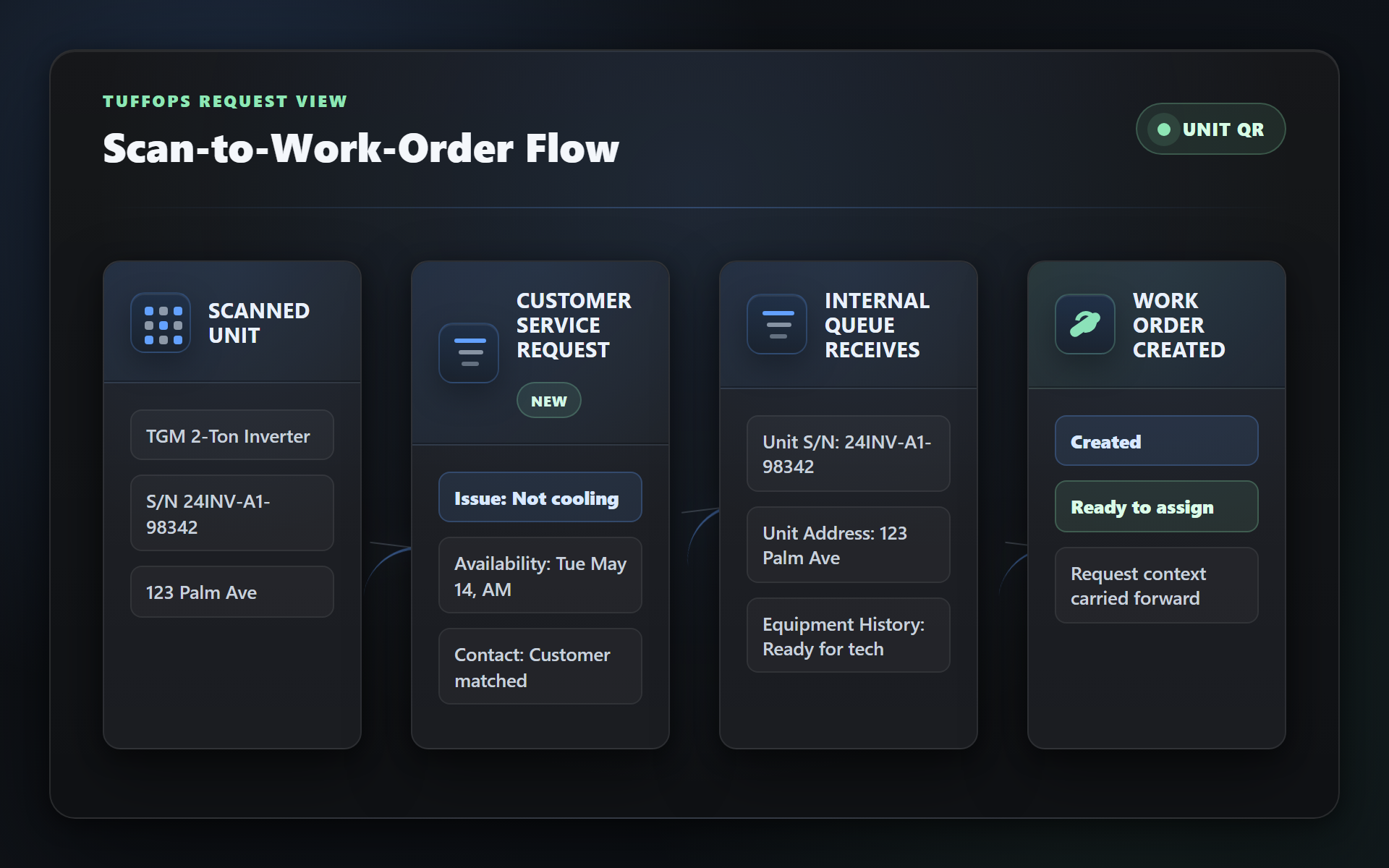
The product code starts public customer requests from a unit QR code, validates the request details, records a requested date and time window, accepts supporting files, and alerts the office. That means the request starts with the unit instead of becoming another loose voicemail, text, or form submission.
QR scan-to-request
Customers scan the unit, describe the issue, choose a date and time window, add contact details, and upload photos or files. The request is saved against the exact equipment record.
Self-service portal for end customers
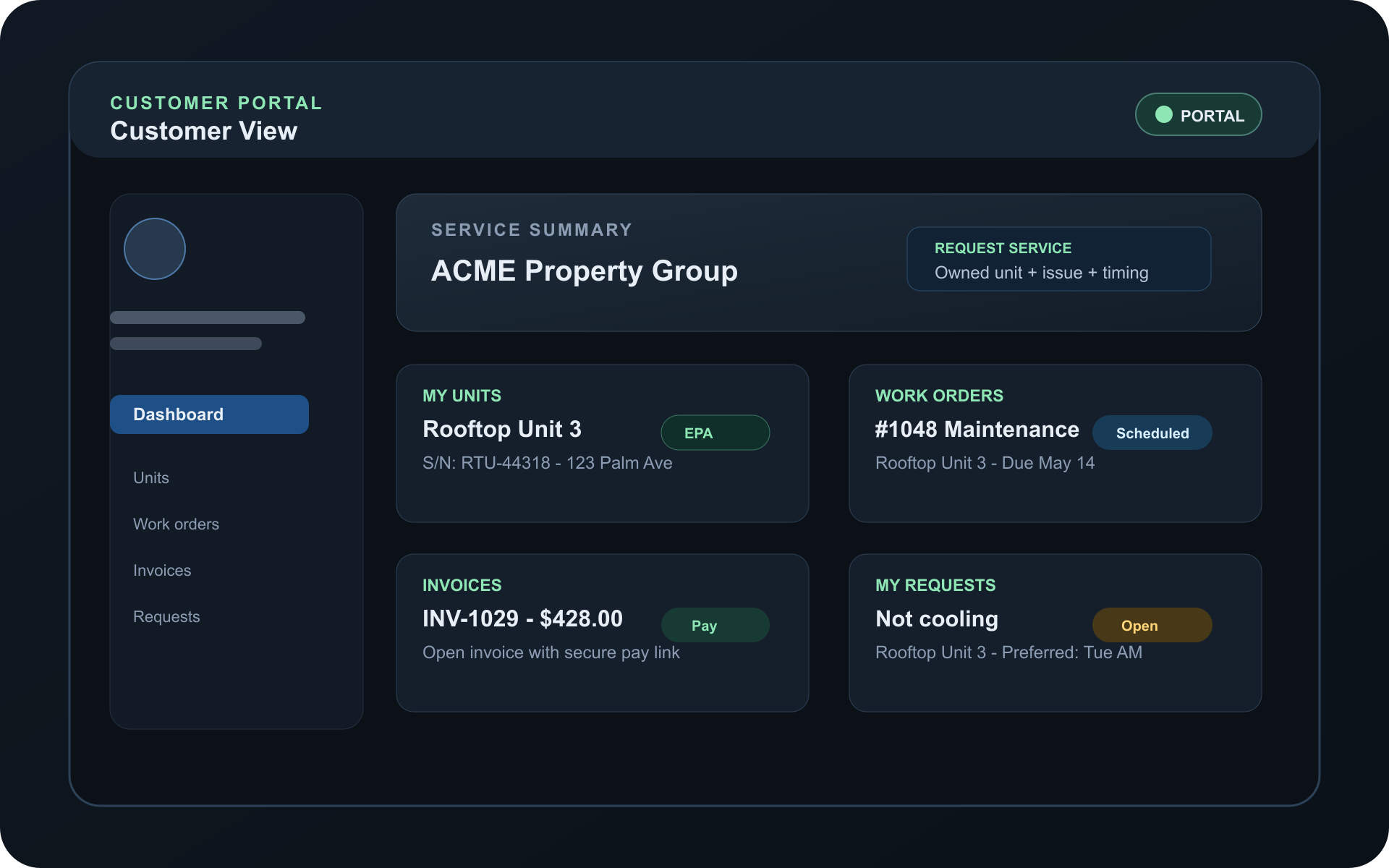
Customers can access service history, equipment, invoices, quotes, messages, documents, and EPA compliance records through a branded customer portal.
Quotes via WhatsApp, SMS, and email
Quotes can reach customers through the channels your shop uses, with public accept/decline flows and quote status history instead of disconnected approval messages.
Bi-directional reminders that free the slot
Work orders track confirmation state, reminders sent, public customer links, and notification timing so dispatch can manage customer responses before the appointment.
Give technicians the equipment record, not just a dispatch note
The product model ties units to work orders, notes, photos, checklists, warranty packets, AHRI classification, linked units, and compliance records. That matters because HVAC technicians work on equipment, not generic tasks.
Checklists that know what equipment they're for
Checklist templates attach by unit, model, and device type, then snapshot onto the work order by job type. Required results, frequency rules, and audit logs keep the field record consistent.
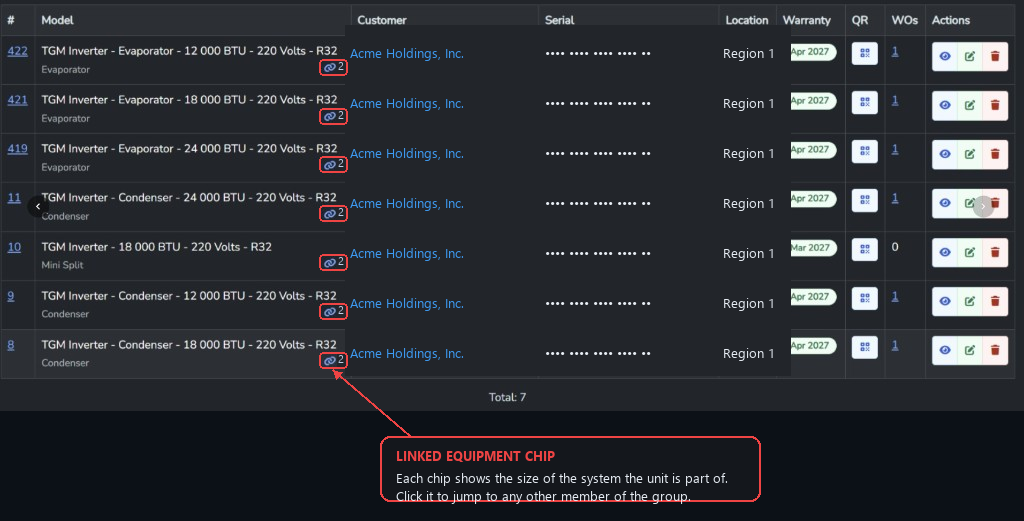
Linked equipment groups
Pair condensers, evaporators, and other components so service history, compliance work, AHRI matching, and warranty context can follow the real HVAC system.
Tap to Pay payments in the field
Field payment configuration is exposed to the mobile API so techs can collect card payments after the work order moves through quote, job, invoice, and completion.
One record from quote to deposited payment
Quotes, work orders, invoices, items, photos, notes, signatures, status history, and payments are product objects, not separate spreadsheets stapled together after the fact.
The EPA rule book, built into the work order
TuffOps includes a dedicated compliance layer for Section 608 and AIM Act Part 84 workflows. The product code contains policy services, leak-rate calculations, repair deadlines, verification deadlines, chronic-leaker classification, recovery equipment, certified-technician controls, automatic leak detection, and records export. For the regulatory background, read the EPA Section 608 and AIM Act Part 84 compliance guide.
Part 84 leak detection & repair
15-lb charge threshold, GWP > 53, 30-day repair clock — applied automatically. Inspector-ready records with eCFR citations on every row.
Section 608 leak rate & recovery
Continued support for the existing Section 608 rules — leak rate calculations, refrigerant recovery records, and certified-tech tracking — alongside Part 84.
Only certified techs can perform regulated work
Compliance settings and certification records support rules around who can perform regulated refrigerant work, with override request and audit models for supervisor control.
Refrigerant tracking at the appliance, not the component
Part 84 defines an "appliance" as the full refrigerant circuit. Linked equipment groups make sure leak rates and repair clocks roll up to the actual appliance — not an arbitrary single-unit record.

The operational details that usually become side work
TuffOps includes the surrounding systems HVAC shops need once the job is real: warranty packet generation, AHRI certificate lookup and classification, inventory material posting, QuickBooks customer sync, customer transfers, business settings, role-based users, mobile capture metadata, alerts, and exports.
| Workflow | What TuffOps records | Why it matters for HVAC shops |
|---|---|---|
| Unit QR request | Unit ID, request text, requested date, morning/afternoon/all-day window, contact info, attached files, alert. | The office starts with the right equipment instead of chasing basic context. |
| Work order | Technician, unit, type, status, confirmation state, public key, reminders, signatures, photos, notes, status history. | Dispatch, field work, customer confirmation, and closeout live on one operational record. |
| Checklist | Snapshot template, required state, result type, frequency rule, refrigerant flag, completion audit. | Maintenance and install work can be enforced by equipment and job type. |
| Compliance | Charge events, leak repairs, leak-rate calculations, inspections, ALD assets, chronic-leaker records, recovery equipment, exports. | Regulated refrigerant work keeps a structured audit trail instead of scattered paperwork. |
| Warranty and AHRI | Warranty equipment kind, AHRI classification, lookup status, packet readiness, packet versions, PDF generation. | Install evidence and matched-system data are gathered while the job is still fresh. |
Want to see all of this in 30 minutes?
Book a walkthrough and we'll show you the parts most relevant to your business — and answer the "does it do X?" questions specific to how you operate.
Book a demoHVAC software feature questions
Is TuffOps built specifically for HVAC contractors?
Yes. The feature set is centered on HVAC units, linked equipment groups, work orders, equipment-aware checklists, warranty registration, AHRI matching, customer QR requests, and refrigerant compliance.
Can customers request service without downloading an app?
Yes. Customers can scan a unit QR code and submit a request with issue details, preferred timing, contact information, and supporting files from a public page.
Does TuffOps support EPA refrigerant compliance workflows?
Yes. TuffOps includes Section 608 and AIM Act Part 84 workflows for leak-rate calculations, repair deadlines, verification deadlines, technician certification controls, chronic-leaker records, automatic leak detection, and exportable records.
Can work orders carry photos, notes, signatures, and checklist results?
Yes. Work orders support photos, notes, technician and customer signatures, status history, customer feedback, checklist instances, inventory posting, and equipment-specific context.
Explore TuffOps solutions
Go deeper on the workflows HVAC teams usually search for when they are ready to replace paper, phone tag, and disconnected tools.