Customer portal
HVAC customer portal software
Give customers a secure HVAC client portal where their own units, work orders, invoices, service requests, and compliance records stay connected to the same TuffOps data your office already manages.
Customer-facing records without a second customer database.
Turn status calls into customer self-service
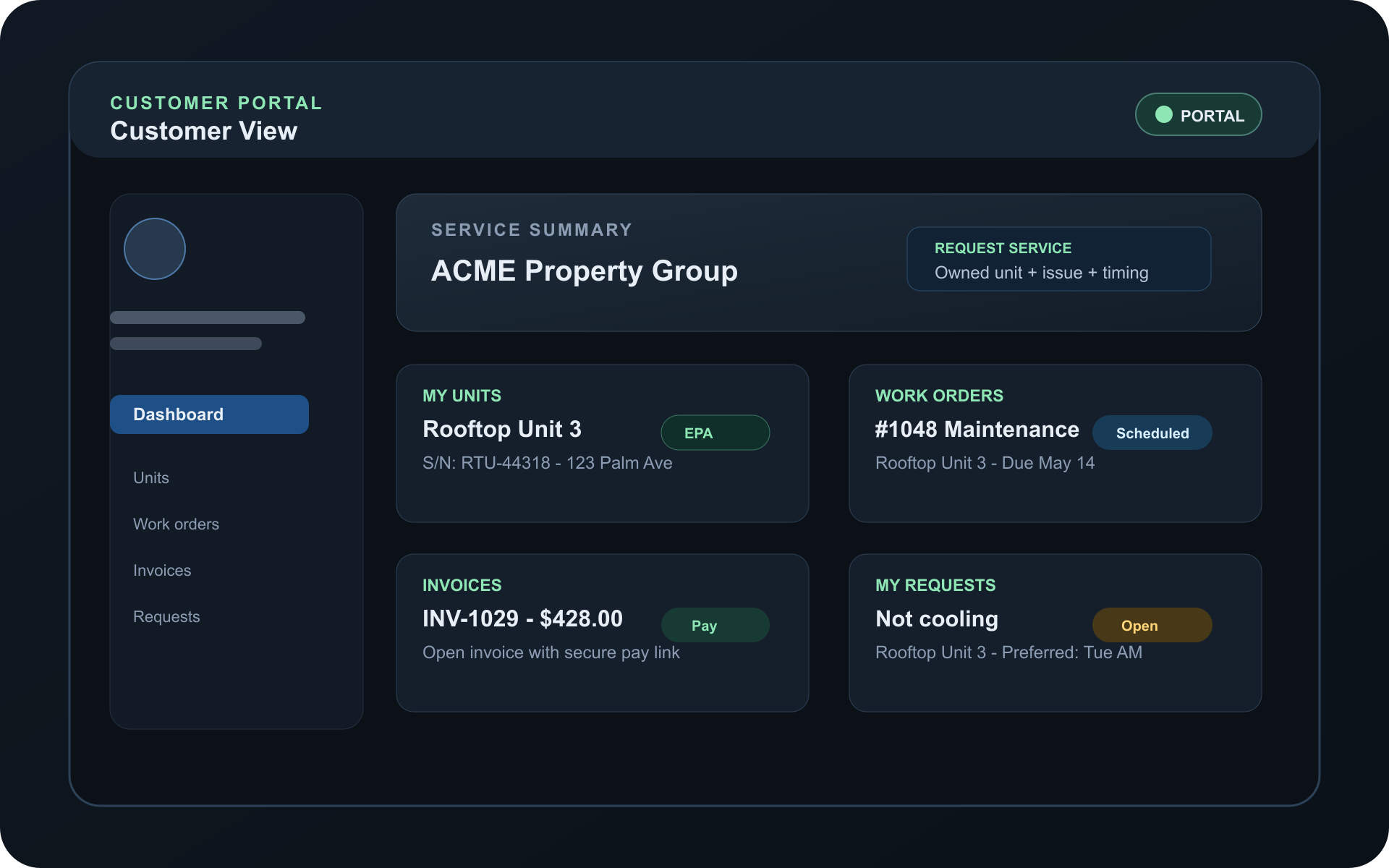
When customers cannot see what is happening, the office becomes the lookup system. The TuffOps customer portal gives them a read-only view of the operational records that matter, plus a service request form that creates a staff-visible customer request.
What happens without a portal
- Customers call to ask which units are on file.
- Work order status stays inside the office system.
- Invoices and payment links get buried in email.
- New service requests arrive as vague calls or texts.
What TuffOps exposes
- Customer-scoped units with serial and address details.
- Recent work orders with unit, due date, type, and status.
- Invoices with status labels and pay links when available.
- Service requests tied to the customer's own units.
Result: customers can answer common questions themselves while your office keeps the source of truth in TuffOps.
Built from customer-facing HVAC records
The portal is not a separate brochure or disconnected client area. It gives each customer a focused view of the customer, unit, work order, invoice, request, and compliance records your team already manages in TuffOps. That keeps customer self-service tied to the operational workflow behind estimates, invoices, and payments.
| Portal area | What customers can see or do | Why it matters |
|---|---|---|
| Units | Customer equipment records, friendly names, serial numbers, addresses, and optional compliance links. | Customers can identify the right equipment before they call, request service, or ask about prior work. |
| Work orders | Recent work orders touching the customer's own units, including status, type, unit name, and due date. | Status and due-date context reduce basic "what is happening with this job?" calls. |
| Invoices | Customer invoices with creation date, total, paid/cancelled/open status, and a Pay link for unpaid invoices with payment URLs. | Customers can find open balances and payment access without searching old emails. |
| Service requests | Customers can submit requests against their own units with issue description, preferred date, preferred time, and contact info. | Requests start with the correct unit, issue, preferred timing, and customer context. |
| EPA records | When enabled, customers can view unit compliance status, refrigerant details, recent refrigerant activity, leak repairs, and inspections. | Commercial customers can review relevant compliance details without asking the office to resend records. |
Connected workflow
From customer login to dispatch-ready request
The portal keeps the customer experience tied to dispatch operations. A request submitted from the portal becomes a TuffOps customer request, creates a staff alert, and stays attached to the unit record.
Login
Customer enters through the portal subdomain.
Review
Units, work orders, invoices, and requests are visible.
Request
Customer selects their unit and describes the issue.
Alert staff
The request lands with unit and customer context.
Customer portal features for HVAC service teams
These are practical customer-facing tools for the questions your office handles every week: what equipment is on file, what work is scheduled, what invoices are open, and how a customer should request service.
Equipment records
Customers see the units connected to their account, including the labels and serial details your staff uses internally.
Work order status
Recent work orders show status and due date context so customers are not calling for basic updates.
Invoice payment
Open invoices can show the payment link already stored on the invoice, while paid and cancelled invoices show their current status.
Service request form
Customers request service against an owned unit, describe the issue, choose preferred timing, and add contact details.
Request history
Submitted requests remain visible with unit, date, description, and current status.
Compliance records
For commercial customers, optional EPA AIM Act and Part 84 portal records can show read-only refrigerant and leak-repair context per unit. The compliance guide explains the recordkeeping backdrop.
Security model: customer data stays customer-scoped
Customer portal SEO copy only matters if the product itself is careful. TuffOps separates the customer portal from the internal team workspace and shows customers only the records tied to their account. For broader platform practices, see TuffOps security.
Separate domain
The portal runs on a customer-facing portal address, separate from the internal team workspace.
Separate guard
Portal access is built for customer users, not internal team accounts.
Scoped records
Customers see units, work orders, invoices, and requests tied to their own account.
For QR service request intake, unauthenticated customers can also start from the unit sticker. For logged-in customers, the portal request form gives a second path using the units already on file.
Who the customer portal helps most
The portal is strongest for HVAC businesses whose customers repeatedly ask for the same operational information: equipment details, appointment progress, invoice status, payment links, and compliance documentation.
Residential service shops
Give homeowners one place to see units, recent work, open invoices, and request status.
Light commercial teams
Help property contacts identify the right unit and request service without rebuilding context by phone.
Property managers
Keep multi-address or multi-unit service history easier to review without asking the office for every detail.
Compliance-heavy accounts
Expose read-only EPA refrigerant and leak-repair records when the portal compliance feature is enabled.
Proof points
What customers can see before calling your office
The portal is designed around concrete, customer-facing records. That makes the page defensible for search because every major claim maps back to a specific product surface.
- Unit
- Friendly name, serial number, address
- Work order
- Status, type, unit, due date
- Invoice
- Total, status, payment link
- Request
- Issue, date, status, unit
- Owned unit selection
- Issue description up to 2,000 characters
- Preferred date and preferred time
- Optional best contact details
- Current status label
- Refrigerant and charge details
- Recent refrigerant activity
- Leak repairs and inspections
HVAC customer portal questions
Do customers need to install anything?
No. The portal is web-based and runs on the configured customer portal subdomain. Customers log in from a browser rather than installing a separate app.
What can customers see in the portal?
Customers can see their own units, recent work orders, invoices, customer requests, and the request service form. If the compliance feature is enabled, they can also view read-only EPA records for their units.
Can customers pay invoices online?
Yes. The invoice card shows invoice status and renders a Pay link for unpaid invoices that have a payment URL from the payment provider.
How are portal service requests protected?
The request form only offers units tied to that customer account, so each request starts with the right customer and equipment context.
How does the portal relate to QR service requests?
QR service requests are best when the customer starts from the equipment sticker without logging in. The portal request form is the logged-in path for customers who want to choose from units already tied to their account.
Can commercial customers see compliance records?
When the customer portal EPA feature is enabled, customers can open read-only unit compliance records with status, refrigerant details, recent refrigerant activity, leak repairs, and leak inspections.
See the Customer Portal live
Book a 30-minute walkthrough and we will show how the portal works alongside dispatch, unit records, work orders, invoices, customer requests, and optional compliance records.
Book a demoExplore TuffOps solutions
Go deeper on the workflows HVAC teams usually search for when they are ready to replace paper, phone tag, and disconnected tools.